Manual Integration
Prerequisite
If you haven't set up a voice agent in the Paygent dashboard yet, please follow our setup guide first. You'll need an Agent ID to start tracking.
Implement complete voice billing flows in Python using Paygent's Session-based tracking.
Voice Pricing
As an architect with decades of experience in high-throughput billing systems, I can tell you that flexibility is the heartbeat of a successful AI platform.
📖 Real-World Scenario
You run a dental clinic AI that handles appointment bookings. You want to charge based on the actual conversation time because longer calls use more compute resources.
💡 Solution
Scenario A: Per-minute ON
When you enable the Per-minute toggle on your Indicator, Paygent calculates the total duration reported in your set_voice_indicator call.
Pricing: $0.15 / min
Duration: 5.0 mins
Result: 5 * 0.15 = $0.75
✅ Result
Perfect for connectivity-based SaaS where you pass on infrastructure costs with a margin.
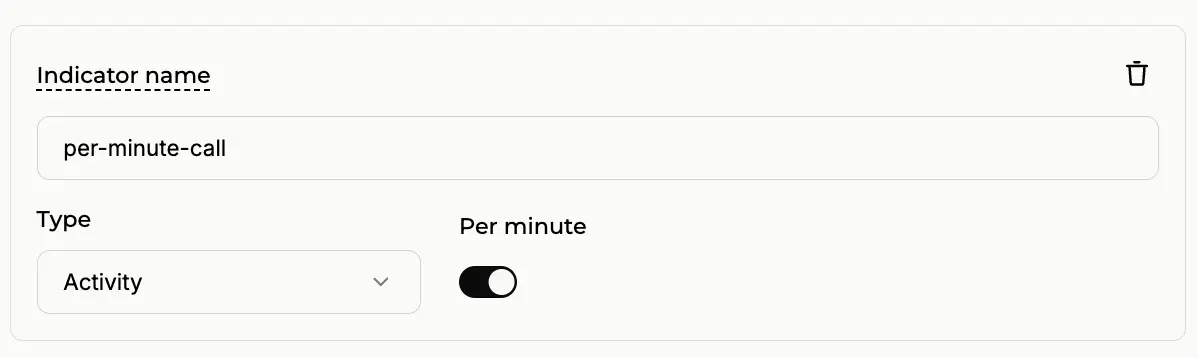
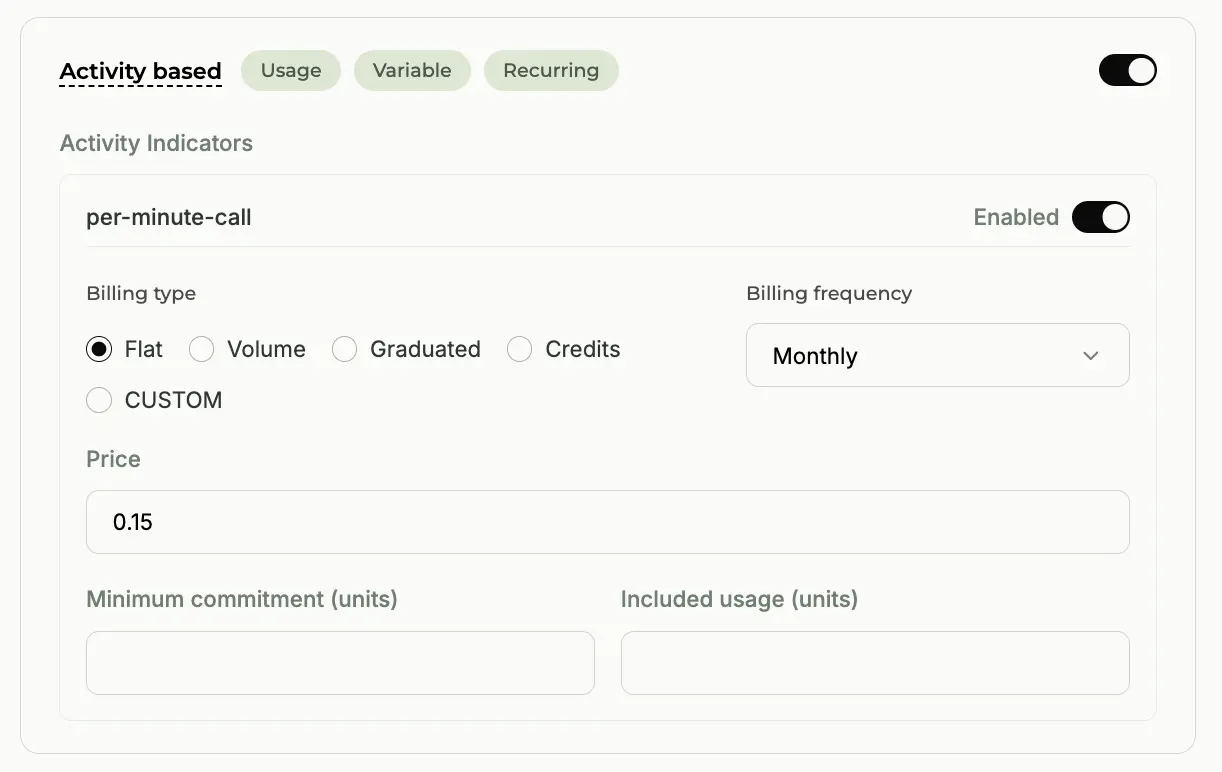
Configuring the Activity Indicator with the Per-minute toggle ON.
📖 Real-World Scenario
You've built a world-class Lead Qualification agent. Your customers don't care how long the call lasts; they only care that the lead was qualified successfully.
💡 Solution
Scenario B: Per-minute OFF
Disable the Per-minute toggle. Now, no matter if the call lasts 1 minute or 20 minutes, the customer is charged a single fixed rate.
Pricing: $0.20 / call
Duration: Any
Result: Flat $0.20
✅ Result
Ideal for outcome-based services where your value is tied to task completion, not duration.
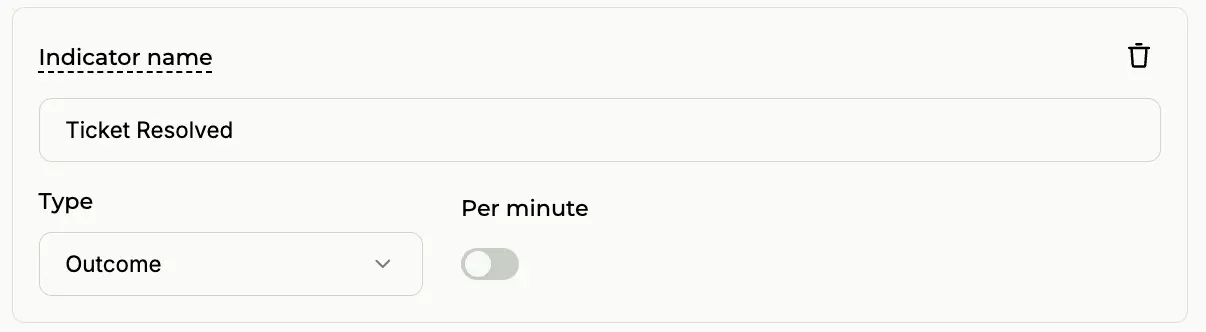
Configuring the Activity Indicator with the Per-minute toggle OFF.
Custom Pricing
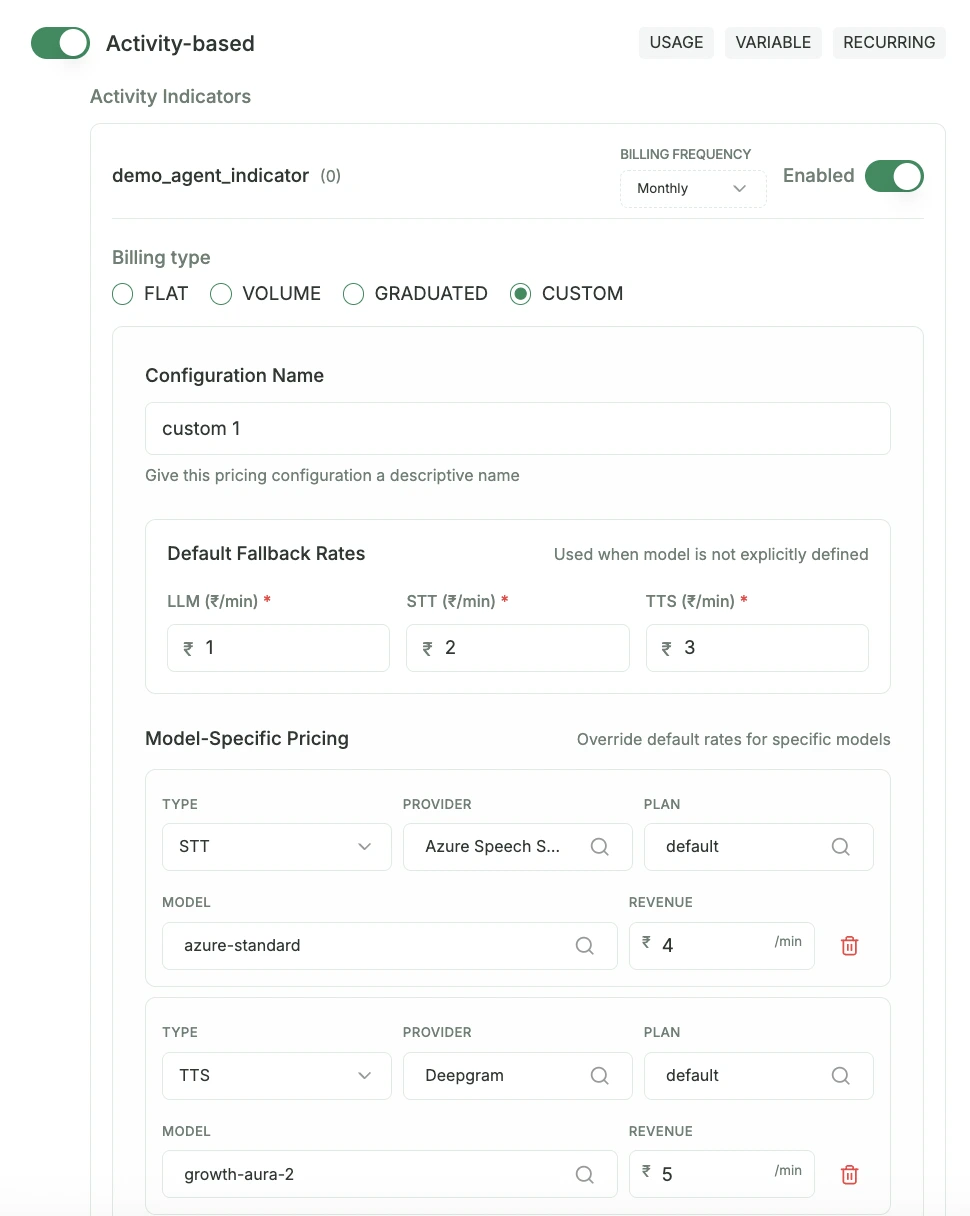
In modern AI architectures, one size rarely fits all. You might use GPT-5 for high-stakes negotiation agents, but switch to Gemini 2.5 for simple data entry tasks.
Tip
Custom Pricing is only visible when the Per-minute switch is ON in Step 2. This allows you to charge based on the specific infrastructure used.
Real-World Custom Example:
Paygent automatically detects the models you track via track_voice_stt, track_voice_llm, and track_voice_tts. You can then set unique per-minute rates for each tier:
- LLM: GPT-5 (Premium)$0.50 / min
- LLM: Gemini 2.5 (Standard)$0.20 / min
- STT: Deepgram Nova-2$0.05 / min
- TTS: Azure Neural$0.08 / min
"With Custom Pricing, you no longer subsidize expensive models with cheap ones. Your margins stay protected while you provide the best possible AI experience."
Complete Voice Session Flow
This example shows how to manage a voice session from start to finish:
1import time
2from paygent_sdk import Client
3from paygent_sdk.models import CustomerCreateOrGetRequest
4from paygent_sdk.constants import ServiceProvider, DeepgramSTTModels, AmazonPollyTTSModels
5
6client = Client(api_key="your-paygent-api-key")
7
8customer_id = "customer-123"
9agent_id = "voice-agent-id"
10
11# 1. Create or Get Customer (Automated)
12client.create_or_get_customer(CustomerCreateOrGetRequest(
13    name="Customer Name",
14    external_id=customer_id
15))
16
17# 2. Define a unique session ID
18# Use your own unique session ID for this customer (e.g., call SID or UUID)
19session_id = f"voice_call_{int(time.time() * 1000)}"
20
21# 3. Initialize Voice Session
22client.initialize_voice_session(session_id, agent_id, customer_id)
23
24# 4. Track User Speech (STT Usage)
25client.track_voice_stt(session_id, {
26    'serviceProvider': ServiceProvider.DEEPGRAM,
27    'model': DeepgramSTTModels.NOVA_2,
28    'plan': 'default',
29    'audioDuration': 20 # audio duration in minutes
30})
31
32# 5. Track AI Processing (LLM Usage)
33client.track_voice_llm(session_id, {
34    'serviceProvider': ServiceProvider.OPENAI,
35    'model': 'gpt-4o',
36    'plan': 'default',
37    'promptTokens': 1000,
38    'completionTokens': 500
39})
40
41# 6. Track AI Speech (TTS Usage)
42client.track_voice_tts(session_id, {
43    'serviceProvider': ServiceProvider.AMAZON_POLLY,
44    'model': AmazonPollyTTSModels.NEURAL,
45    'plan': 'default',
46    'character_count': 28000
47})
48
49# 7. Final Step: Set Indicator with Call Duration (Minutes)
50client.set_voice_indicator(session_id, "voice_call_completed", 0.5)
How it Works
A frictionless, step-by-step developer experience designed for the modern AI stack.
On-the-fly Onboarding
The create_or_get_customer method allows for frictionless user onboarding. If a customer with the external_id doesn't exist, Paygent creates one automatically.
Session Context
initialize_voice_session sets up a billing context for the call. This ensures all subsequent STT, LLM, and TTS usage is grouped under this single call session.
Detailed Analytics
Track every event within the voice pipeline. Paygent provides deep insights into which models are being used and the associated costs in real-time.
Final Outcome
Finalize the session with set_voice_indicator. Use the duration or outcome-based indicators to accurately bill your customers.
Was this page helpful?
Need help? Contact us at support@withpaygent.com