Node.js - Voice Tracking
Prerequisite
If you haven't set up a voice agent in the Paygent dashboard yet, please follow our setup guide first. You'll need an Agent ID to start tracking.
Paygent provides a robust Session-based flow for tracking complex Voice AI interactions, including STT, LLM, and TTS usage.
Voice Pricing
As an architect with decades of experience in high-throughput billing systems, I can tell you that flexibility is the heartbeat of a successful AI platform.
📖 Real-World Scenario
You run a dental clinic AI that handles appointment bookings. You want to charge based on the actual conversation time because longer calls use more compute resources.
💡 Solution
Scenario A: Per-minute ON
When you enable the Per-minute toggle on your Indicator, Paygent calculates the total duration reported in your setVoiceIndicator call.
Pricing: $0.15 / min
Duration: 5.0 mins
Result: 5 * 0.15 = $0.75
✅ Result
Perfect for connectivity-based SaaS where you pass on infrastructure costs with a margin.
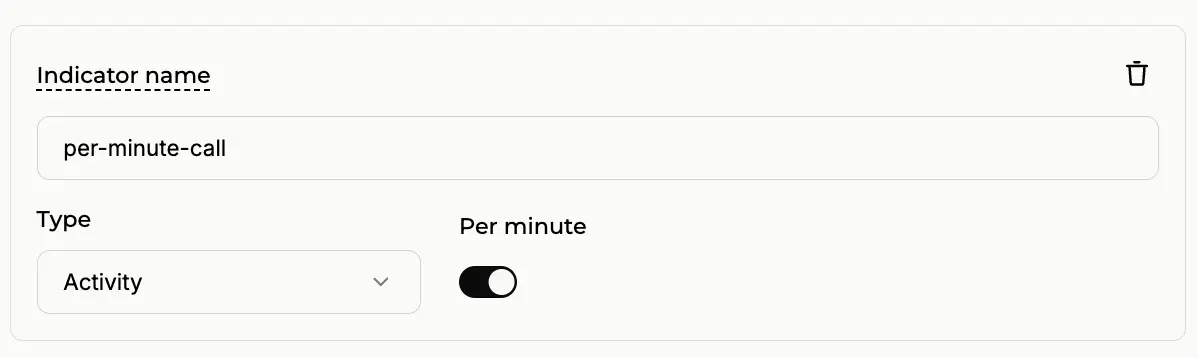
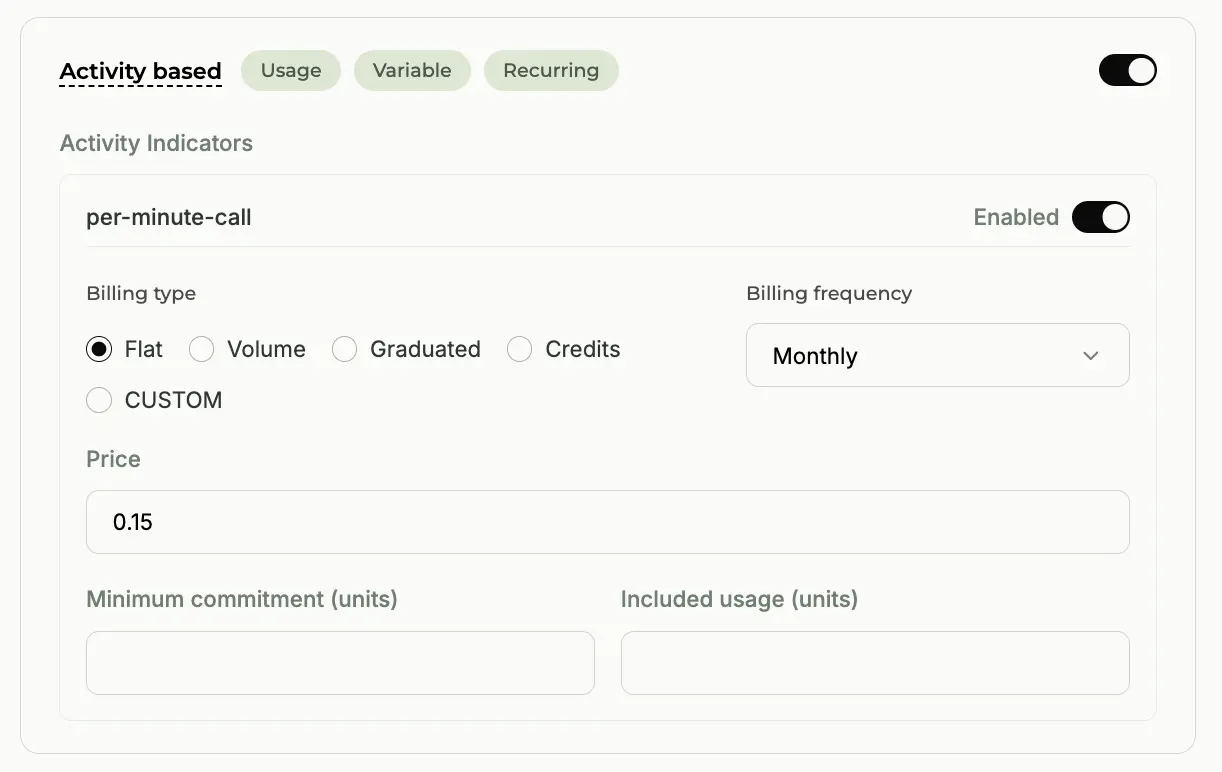
Configuring the Activity Indicator with the Per-minute toggle ON.
📖 Real-World Scenario
You've built a world-class Lead Qualification agent. Your customers don't care how long the call lasts; they only care that the lead was qualified successfully.
💡 Solution
Scenario B: Per-minute OFF
Disable the Per-minute toggle. Now, no matter if the call lasts 1 minute or 20 minutes, the customer is charged a single fixed rate.
Pricing: $0.20 / call
Duration: Any
Result: Flat $0.20
✅ Result
Ideal for outcome-based services where your value is tied to task completion, not duration.
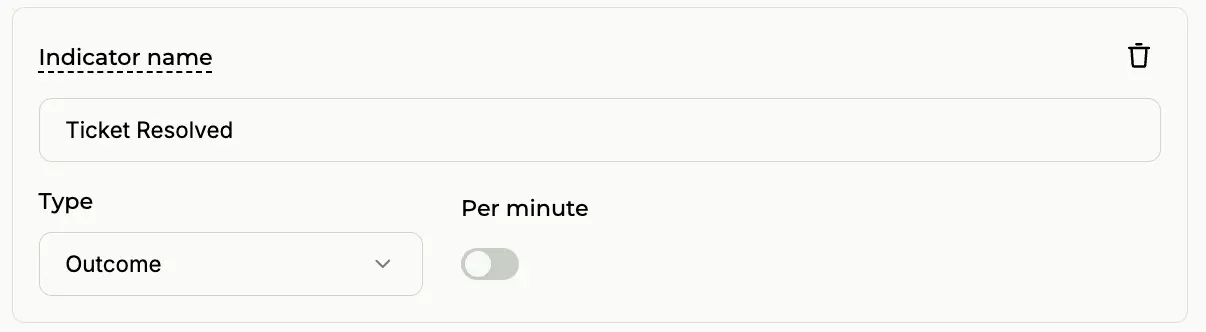
Configuring the Activity Indicator with the Per-minute toggle OFF.
Custom Pricing
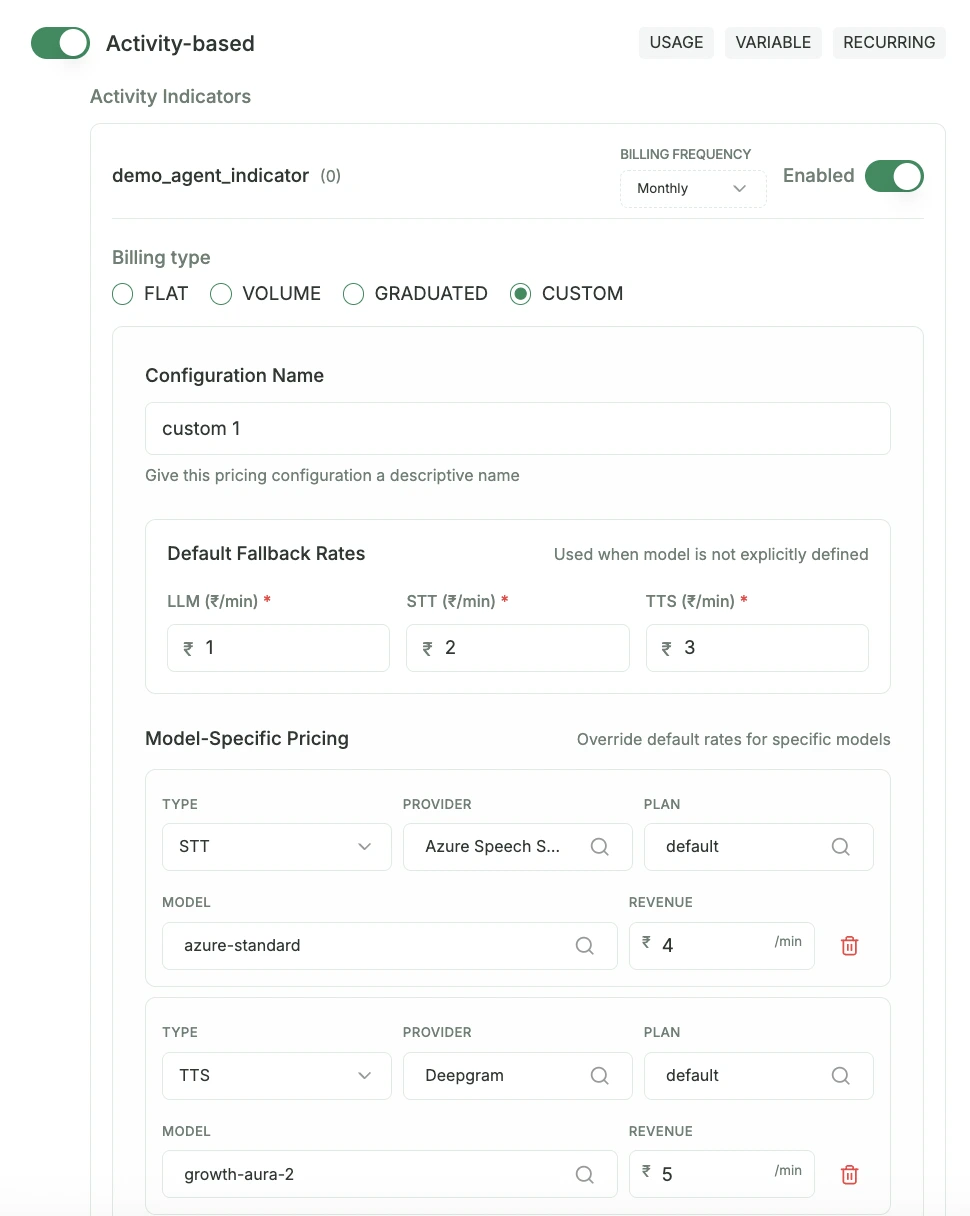
In modern AI architectures, one size rarely fits all. You might use GPT-5 for high-stakes negotiation agents, but switch to Gemini 2.5 for simple data entry tasks.
Tip
Custom Pricing is only visible when the Per-minute switch is ON in Step 2. This allows you to charge based on the specific infrastructure used.
Real-World Custom Example:
Paygent automatically detects the models you track via trackVoiceStt, trackVoiceLlm, and trackVoiceTts. You can then set unique per-minute rates for each tier:
- LLM: GPT-5 (Premium)$0.50 / min
- LLM: Gemini 2.5 (Standard)$0.20 / min
- STT: Deepgram Nova-2$0.05 / min
- TTS: Azure Neural$0.08 / min
"With Custom Pricing, you no longer subsidize expensive models with cheap ones. Your margins stay protected while you provide the best possible AI experience."
Complete Voice Session Flow
This flow demonstrates how to manage a complete voice call session:
1import {
2    PaygentClient,
3    ServiceProvider,
4    DeepgramSTTModels,
5    AmazonPollyTTSModels
6} from '@paygent_org/paygent-sdk-node';
7
8const client = PaygentClient.newClient(process.env.PAYGENT_API_KEY);
9
10// 1. Create or Get Customer (Automated)
11await client.createOrGetCustomer({
12    name: "customer_name",
13    externalId: "customer_123",
14});
15
16// 2. Define a unique session ID
17// Use your own unique session ID for this customer (e.g., call SID or UUID)
18const sessionId = `voice_call_${Date.now()}`;
19const agentId = "your-agent-id";
20const customerId = "customer_123";
21
22// 3. Initialize Voice Session
23await client.initializeVoiceSession(sessionId, agentId, customerId);
24
25// 4. Track User Speech (STT Usage) - 20 seconds
26await client.trackVoiceStt(sessionId, {
27    serviceProvider: ServiceProvider.DEEPGRAM,
28    model: DeepgramSTTModels.NOVA_2,
29    audioDuration: 20
30});
31
32// 5. Track AI Processing (LLM Usage)
33await client.trackVoiceLlm(sessionId, {
34    serviceProvider: ServiceProvider.OPENAI,
35    model: 'gpt-4o',
36    promptTokens: 1000,
37    completionTokens: 500
38});
39
40// 6. Track AI Speech (TTS Usage) - 28,000 characters
41await client.trackVoiceTts(sessionId, {
42    serviceProvider: ServiceProvider.AMAZON_POLLY,
43    model: AmazonPollyTTSModels.NEURAL,
44    characterCount: 28000
45});
46
47// 7. Final Step: Set Indicator with Call Duration (Minutes)
48// e.g., Set an indicator for a 10-minute call
49await client.setVoiceIndicator(sessionId, "voice_call_completed", 10);
How it Works
A frictionless, step-by-step developer experience designed for the modern AI stack.
Customer Onboarding
The createOrGetCustomer call ensures the customer exists in Paygent. If they don't, we'll create them instantly using the provided externalId.
Session Initialization
Initialize a stateful session. This 'anchors' all future usage (STT, LLM, TTS) to this specific call, agent, and customer.
Granular Tracking
Track every step of the voice pipeline independently. Paygent calculates precise costs for each model used during the conversation.
Final Indicator & Billing
When the call ends, set a final indicator with the total duration. This allows you to bill customers based on per-minute connectivity or success outcomes.
Was this page helpful?
Need help? Contact us at support@withpaygent.com